Writing Logic and Functions
Loops: Repeating Actions with for and while
8 min read
Some tasks require repetition
Imagine you need to send a "Happy Birthday" email to each of 500 customers. Writing 500 separate print() calls is absurd. What you need is a way to repeat the same action for each item in a list — automatically.
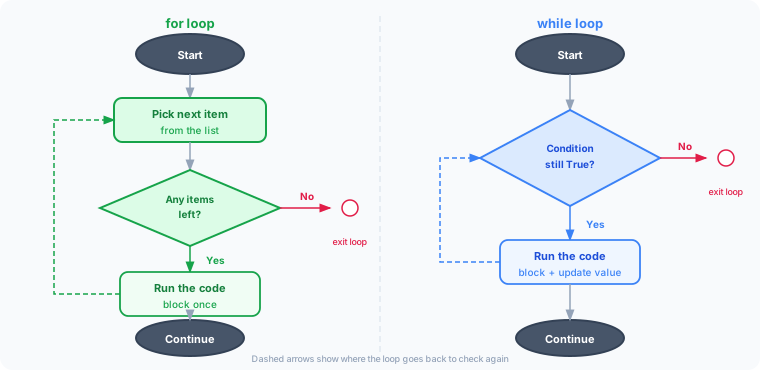
That's exactly what loops do. A loop runs a block of code repeatedly, either once for each item in a collection (for loop) or as long as a condition is true (while loop).
The for loop
A for loop goes through each item in a collection — one at a time — and runs the code block for each one.
colors = ["red", "green", "blue"]
for color in colors:
    print("Color:", color)
Output:
Color: red
Color: green
Color: blue
Reading it aloud: "For each color in colors, print 'Color:' followed by that color."
Python picks the next item from the list on each pass through the loop, assigns it to color, and runs the indented block. When the list runs out, the loop ends.
Looping over a range of numbers
range() generates a sequence of numbers — useful when you want to repeat something a specific number of times:
for i in range(5):
    print("Step:", i)
Output:
Step: 0
Step: 1
Step: 2
Step: 3
Step: 4
range(5) produces the numbers 0, 1, 2, 3, 4 (not including 5). range(1, 6) would produce 1, 2, 3, 4, 5.
range() also accepts an optional step as a third argument:
print(list(range(4, 10)))     # [4, 5, 6, 7, 8, 9]
print(list(range(4, 10, 2)))  # [4, 6, 8]
range(start, end) counts from start up to (but excluding) end. Adding a third number, range(start, end, step), changes how much it counts by each time.
Looping with an index: enumerate()
Sometimes you need both an item and its position while looping. enumerate() gives you both at once:
colors = ["red", "green", "yellow", "brown"]
for index, color in enumerate(colors):
    print(f"color {color} at pos {index}")
Output:
color red at pos 0
color green at pos 1
color yellow at pos 2
color brown at pos 3
Without enumerate(), getting the index would mean looping over range(len(colors)) and looking up colors[i] manually — more code, more room for off-by-one mistakes.
The Pythonic way to loop
There's more than one way to loop over a list by index, but they're not equally good:
# Works, but not idiomatic Python
i = 0
while i < len(my_list):
    do_something(my_list[i])
    i += 1

# Better — no manual counter to manage
for i in range(len(my_list)):
    do_something(my_list[i])

# Best — when you don't actually need the index
for element in my_list:
    do_something(element)
Prefer the plainest loop that gets the job done: iterate directly over the collection unless you specifically need the index, and reach for enumerate() when you need both the index and the value.
The while loop
A while loop keeps running as long as a condition is True. It checks the condition before each iteration.
countdown = 5
while countdown > 0:
    print("Countdown:", countdown)
    countdown -= 1
print("Blast off!")
Output:
Countdown: 5
Countdown: 4
Countdown: 3
Countdown: 2
Countdown: 1
Blast off!
Step by step:
- Check: is
countdown > 0? Yes (5 > 0) → run the block - Print
Countdown: 5, then subtract 1 →countdownis now 4 - Check again: is
4 > 0? Yes → run again - ... repeat until
countdownreaches 0 - Check: is
0 > 0? No → loop ends, program continues
Warning: if the condition never becomes
False, the loop runs forever — an "infinite loop." Always make sure yourwhileloop has a way to end.
Combining loops and conditionals
Loops and if statements work extremely well together. Here's an example that categorizes a list of numbers:
numbers = [3, 10, 7, 2, 11, 8]
for num in numbers:
    if num % 2 == 0:
        print(num, "is even")
    else:
        print(num, "is odd")
Output:
3 is odd
10 is even
7 is odd
2 is even
11 is odd
8 is even
The % operator gives the remainder after division. A number is even if the remainder after dividing by 2 is 0.
break and continue
Two special keywords give you extra control inside loops:
break — exit the loop immediately
numbers = [5, 3, 8, 1, 9, 2]
for num in numbers:
    if num == 8:
        print("Found 8! Stopping.")
        break
    print(num)
Output:
5
3
Found 8! Stopping.
continue — skip the rest of the current iteration
for i in range(1, 8):
    if i == 4:
        continue  # skip 4
    print(i)
Output:
1
2
3
5
6
7
The pass statement
pass is a null operation — a placeholder that does nothing when it runs. Python requires every if, for, while, and def block to contain at least one statement, so pass is what you use when you don't have any code to write yet, but the syntax still needs a body:
for i in range(10):
    pass   # loop body intentionally left empty for now

def todo_later():
    pass   # function stub — implement this later
It's most useful while you're sketching out a program's structure and want to fill in the logic afterward without breaking the syntax in the meantime.
The for...else construct
A for loop can have an else clause. It runs once, automatically, only if the loop finishes without hitting a break. This is useful for search-style loops where you want to know whether something was found.
for num in range(2, 50):
    for divisor in range(2, num):
        if num % divisor == 0:
            print(num, "Not Prime")
            break
    else:
        print(num, "Prime")
For each num, the inner loop checks every possible divisor. If it finds one that divides evenly, it prints "Not Prime" and breaks immediately — which skips the inner loop's else. If the inner loop never finds a divisor and runs to completion, its else clause fires and prints "Prime".
Read for...else as: "else, if the loop never broke." It pairs naturally with break — without a break in the loop, else would just run every time, which isn't very useful.
Useful patterns
Sum all items in a list
sales = [120, 85, 200, 67, 145]
total = 0
for amount in sales:
    total = total + amount
print("Total sales:", total)  # 617
Collect items that match a condition
scores = [45, 82, 61, 90, 38, 74]
passing = []
for score in scores:
    if score >= 60:
        passing.append(score)
print("Passing scores:", passing)
# [82, 61, 90, 74]
Loop through a dictionary
inventory = {
    "pen": 12,
    "notebook": 5,
    "eraser": 3
}
for item, count in inventory.items():
    print(f"{item}: {count} in stock")
Output:
pen: 12 in stock
notebook: 5 in stock
eraser: 3 in stock
for vs. while — when to use each
Use for when... | Use while when... |
|---|---|
| You're iterating over a known collection | You're running until a condition changes |
| You know exactly how many times to repeat | You don't know in advance how many times to repeat |
| Processing a list, string, or dictionary | Waiting for user input, polling a status, counting down |
Most loops in Python are for loops. Reach for while when you genuinely don't know how many iterations you'll need.
Key takeaway
for loops repeat code once for each item in a collection. while loops repeat code as long as a condition is true. Both can be combined with if statements to add conditional logic inside the repetition. break exits a loop early; continue skips the current iteration. Loops are one of the most powerful tools in programming — almost nothing useful gets done without them.
What's next?
As programs grow, you'll find yourself writing the same logic in multiple places. Functions solve this by letting you package reusable code under a name — write it once, call it anywhere.