Writing Logic and Functions
Control Flow: Making Decisions with if, elif, and else
6 min read
Programs need to make choices
Think about how a transit system works. If you're under 13, you pay a child fare. If you're between 13 and 17, you pay a teen fare. Otherwise, you pay the adult fare. The system checks your age and responds differently depending on what it finds.
Every non-trivial program has decision points like this. Python handles them with conditional statements: if, elif, and else.
The if statement
The simplest form: check one condition, and if it's true, do something.
temperature = 35
if temperature > 30:
    print("It's hot outside. Bring water.")
Output:
It's hot outside. Bring water.
How it works:
- Python evaluates the condition:
temperature > 30 - The result is either
TrueorFalse - If
True, the indented block runs. IfFalse, it's skipped.
Indentation matters. The code inside an if block must be indented (4 spaces or one tab). Python uses indentation to know which lines belong to the block.
The else clause
else provides a fallback — what to do when the condition is False:
temperature = 35
if temperature > 30:
    print("It's hot outside. Bring water.")
else:
    print("The weather looks fine.")
Exactly one of the two blocks will always run.
The elif clause
elif (short for "else if") lets you check multiple conditions in sequence:
age = 15
if age < 13:
    print("Child fare")
elif age < 18:
    print("Teen fare")
else:
    print("Adult fare")
Output:
Teen fare
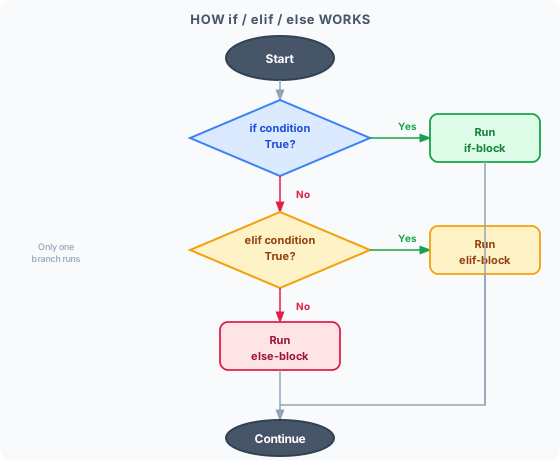
Python checks conditions from top to bottom and runs the first one that's True. The else block runs if none of the conditions are true.
You can have as many elif branches as you need.
Comparison operators
The conditions you write use comparison operators that produce True or False:
| Operator | Meaning | Example | Result |
|---|---|---|---|
== | Equal to | 5 == 5 | True |
!= | Not equal to | 5 != 3 | True |
> | Greater than | 10 > 7 | True |
< | Less than | 3 < 1 | False |
>= | Greater than or equal | 5 >= 5 | True |
<= | Less than or equal | 4 <= 3 | False |
Reminder:
=assigns a value.==compares two values. This is one of the most common beginner mistakes.
A grading example
Here's a complete example that converts a numeric score to a letter grade:
score = 82
if score >= 90:
    grade = "A"
elif score >= 80:
    grade = "B"
elif score >= 70:
    grade = "C"
elif score >= 60:
    grade = "D"
else:
    grade = "F"

print(f"Score: {score}, Grade: {grade}")
Output:
Score: 82, Grade: B
Python checks each condition top-to-bottom. A score of 82 doesn't meet >= 90, but it does meet >= 80, so grade = "B" runs and Python skips the rest.
Checking membership: the in keyword
in checks whether a value appears inside a list, string, or other collection:
allowed_users = ["alice", "bob", "priya"]
username = "priya"

if username in allowed_users:
    print("Welcome,", username)
else:
    print("Access denied.")
Output:
Welcome, priya
Combining conditions: and and or
Use and when both conditions must be true. Use or when at least one must be true.
age = 20
has_id = True

if age >= 18 and has_id:
    print("Entry permitted.")
else:
    print("Cannot enter.")
is_weekend = True
is_holiday = False

if is_weekend or is_holiday:
    print("The store is open extended hours.")
Use not to reverse a condition:
is_logged_in = False
if not is_logged_in:
    print("Please log in to continue.")
Nested conditionals
You can put if statements inside other if statements. Use this sparingly — deeply nested code becomes hard to read:
score = 85
attendance = 92

if score >= 60:
    if attendance >= 75:
        print("Passed the course.")
    else:
        print("Passed the exam, but failed due to low attendance.")
else:
    print("Failed the exam.")
Real-world examples
Membership discount
is_member = True
purchase_total = 120.00

if is_member and purchase_total > 100:
    discount = purchase_total * 0.15
    print(f"Member discount: ${discount:.2f}")
    print(f"You pay: ${purchase_total - discount:.2f}")
else:
    print(f"Total: ${purchase_total:.2f}")
Age verification
age = 16
if age >= 18:
    print("You may proceed.")
else:
    print("You must be 18 or older.")
Practice: spot the bug in FizzBuzz
"FizzBuzz" is a classic exercise: for numbers 1 through 29, print "fris" if the number is divisible by 3, "Buzz" if divisible by 5, and "frizzbuzz" if divisible by both. Here's one attempt (this snippet loops through a range of numbers — you'll cover loops properly next, but the bug is entirely about elif order):
for num in range(1, 30):
    if num % 3 == 0:
        print(str(num) + " fris")
    elif num % 5 == 0:
        print(str(num) + " Buzz")
    else:
        if num % 3 == 0 and num % 5 == 0:
            print(str(num) + " frizzbuzz")
Running this, 15 (divisible by both 3 and 5) prints "15 fris" instead of "15 frizzbuzz". Why? Python checks if num % 3 == 0 first, and 15 satisfies it — so Python runs that branch and skips everything else, including the elif and the nested check that would have caught the "both" case. The nested if for divisibility by both numbers is unreachable dead code, because by the time execution reaches the else, the number has already failed the divisible-by-3 check.
The fix is to check the most specific condition first — "divisible by both" is more specific than "divisible by 3 alone":
for num in range(1, 30):
    if num % 3 == 0 and num % 5 == 0:
        print(str(num) + " frizzbuzz")
    elif num % 3 == 0:
        print(str(num) + " fris")
    else:
        if num % 5 == 0:
            print(str(num) + " buzz")
Lesson: when conditions overlap, order matters. Python stops at the first True branch, so the more specific check needs to come before the more general one.
Key takeaway
if, elif, and else let your program respond differently to different situations. Python evaluates conditions from top to bottom, runs the first True branch, and skips the rest. Comparison operators (==, !=, >, <, >=, <=) produce the True/False values that conditions are built from.
What's next?
Conditionals let you choose what code runs. Loops let you run the same code repeatedly — automatically cycling through a list, counting down, or repeating until something changes. That's the next lesson.