Working with Text and Collections
Strings and String Methods
9 min read
Text is everywhere in programming
Think about the software you use every day — email apps, social media, shopping sites, messaging. The vast majority of what those apps handle is text: names, messages, addresses, search queries, product descriptions.
In Python, text is stored as strings, and Python gives you a rich set of tools for working with them. This lesson covers the most important ones.
Creating strings
A string is any sequence of characters enclosed in quotes. Both single '...' and double "..." quotes work:
first_name = "Taylor"
last_name = 'Jordan'
city = "New York"
For strings that span multiple lines, use triple quotes:
message = """This is a
multi-line
string."""
Combining strings (concatenation)
You can join strings together using the + operator. This is called concatenation:
first_name = "Taylor"
last_name = "Jordan"
full_name = first_name + " " + last_name

print("Hello, " + full_name)
Output:
Hello, Taylor Jordan
The " " between the names adds a space. Without it, you'd get "TaylorJordan".
Concatenation only works between strings. Mixing in a number raises an error:
'foo' + 'bar' + 123
# TypeError: cannot concatenate 'str' and 'int' objects
Convert the number to a string first with str():
print('foo' + 'bar' + str(123))
# foobar123
Strings are immutable
Once a string is created, it can't be changed in place. Trying to assign to a character or delete one raises an error:
message = "Python is awesome"
message[0] = "J"
# TypeError: 'str' object does not support item assignment

del message[0]
# TypeError: 'str' object does not support item deletion
This is called immutability. It doesn't mean the variable is stuck — a variable can always be reassigned to a brand-new string:
message = "Python is awesome"
message = "Python is dynamically typed"
print(message)   # Python is dynamically typed
What can't happen is modifying the existing string object in place. Every string method you'll see below (.upper(), .replace(), .strip(), and the rest) works around this by returning a new string rather than changing the original.
f-strings: a cleaner way to combine text
Typing + signs between every piece of text gets messy quickly. Python 3 introduced f-strings (formatted strings) — a much cleaner way to embed variables directly inside text:
full_name = "Taylor Jordan"
age = 28

print(f"Welcome, {full_name}!")
print(f"You are {age} years old.")
Output:
Welcome, Taylor Jordan!
You are 28 years old.
Put an f immediately before the opening quote, then wrap any variable name in curly braces {}. Python automatically substitutes the value. This works with any data type — strings, numbers, booleans.
f-strings are the preferred modern approach and you'll see them constantly in real Python code.
String indexing: accessing individual characters
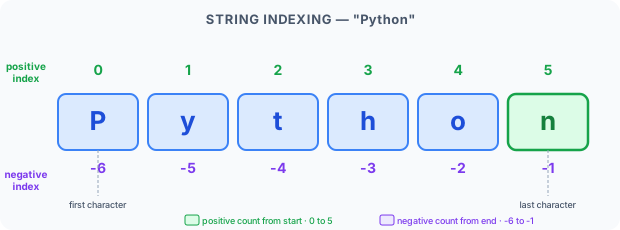
A string is an ordered sequence of characters. Each character has a numbered position called an index, starting at 0:
P  y  t  h  o  n
0  1  2  3  4  5
To access a specific character, use square brackets with the index:
message = "Python is fun"
print(message[0])   # P  (first character)
print(message[7])   # i
print(message[-1])  # n  (last character)
print(message[-3])  # f  (third from end)
Negative indexes count from the end backwards. -1 is the last character, -2 is second-to-last, and so on.
String slicing: extracting parts of text
Slicing lets you extract a portion of a string using the format [start:end]. The slice goes from the start index up to (but not including) the end index:
message = "Python is fun"
print(message[0:6])    # Python
print(message[7:9])    # is
print(message[10:])    # fun  (from index 10 to the end)
print(message[:6])     # Python  (from the beginning to index 6)
print(message[-3:])    # fun  (last 3 characters)
A couple more examples:
my_string = "Hello World"
print(my_string[0:4])   # Hell
print(my_string[6:11])  # World
print(my_string[10])    # d
Built-in string methods
Python strings come with a built-in toolbox of methods — functions that are attached to strings and can transform or inspect them. You call a method by writing the variable name, a dot, and the method name with parentheses.
Changing case
sample = "  welcome to python programming  "

print(sample.upper())    # WELCOME TO PYTHON PROGRAMMING
print(sample.lower())    # welcome to python programming
print(sample.title())    # Welcome To Python Programming

message = "enter the dragon"
print(message.capitalize())   # Enter the dragon
Real-world use: normalizing user input before comparing it ("did they type 'yes', 'Yes', or 'YES'?"). .capitalize() capitalizes just the first character of the string and lowercases the rest.
Removing whitespace
sample = "  welcome to python programming  "
print(sample.strip())    # welcome to python programming
print(sample.lstrip())   # 'welcome to python programming  '  (only leading space removed)
print(sample.rstrip())   # '  welcome to python programming' (only trailing space removed)
.strip() removes leading and trailing spaces. .lstrip() and .rstrip() do just one side each. All three are extremely useful when processing data that users have typed, since they often accidentally add spaces.
Any of them also accepts a set of characters to strip instead of whitespace:
message = "--enter the dragon--"
print(message.strip('-'))    # enter the dragon
print(message.lstrip('-'))   # enter the dragon--
print(message.rstrip('-'))   # --enter the dragon
Replacing text
sample = "  welcome to python programming  "
print(sample.replace("python", "Python"))
# welcome to Python programming
.replace(old, new) swaps every occurrence of old with new.
Searching within strings
message = "Python is easy to learn"
print(message.find("easy"))         # 10  (index where "easy" starts)
print(message.startswith("Python")) # True
print(message.endswith("learn"))    # True
print("python" in message.lower())  # True
.find() returns the index where a substring starts, or -1 if it's not found.
.startswith(text) and .endswith(text) check the beginning or end of a string and return True/False. Both accept optional begin and end positions to check only part of the string:
text = "explicit is better than implicit"
print(text.startswith("is", 9))          # True  (check starting from index 9)
print(text.endswith("than", 19, 23))     # True  (check only the slice [19:23])
in checks whether one string appears inside another (returns True or False).
Splitting and joining
message = "Python is easy to learn"
words = message.split()    # splits on spaces by default
print(words)               # ['Python', 'is', 'easy', 'to', 'learn']

joined = "-".join(words)
print(joined)              # Python-is-easy-to-learn
.split() breaks a string into a list of pieces. .join() does the reverse — it combines a list of strings into one, with a separator in between.
You can split on any delimiter, not just spaces — pass it as an argument:
message = "enter-the-dragon"
print(message.split('-'))   # ['enter', 'the', 'dragon']
Real-world example: parsing a URL's query string
.split() and .join() are especially useful together for pulling apart and rebuilding structured text, like a URL:
link = "foo.com/forum?filter=comments&num=20"

# Step 1: split off the query string
url, qs = link.split('?')

# Step 2: split the query string into individual parameters
params = qs.split('&')
print(params)   # ['filter=comments', 'num=20']

# Step 3: update a parameter
params[0] = "filter=views"
params[1] = "num=15"

# Step 4: join the parameters back into a query string, then rejoin with the url
qs = '&'.join(params)
new_link = '?'.join([url, qs])
print(new_link)
# foo.com/forum?filter=views&num=15
Each .split() breaks a bigger string into smaller pieces along a delimiter; each .join() glues pieces back together. Chaining them like this is a common pattern for working with URLs, CSV rows, and other delimited text.
Practice: reversing a string
Combining a loop with string concatenation lets you build a new string one character at a time. You'll cover loops properly in a later lesson, but here's a preview — building the reverse of a string by prepending each character:
input_str = "My name is Ashish"
output = ""
for char in input_str:
    output = char + output

print(output)
# hsihsA si eman yM
Each character gets added to the front of output, so by the end the string comes out backwards. The same pattern works on the string form of a number:
input_num = 23102
output = ""
for char in str(input_num):
    output = char + output

print(int(output))
# 20132
Shortcut: Python also lets you reverse a string in one line with slicing:
input_str[::-1]. The loop version above is worth knowing because the same accumulate-as-you-go pattern shows up constantly once you get to loops.
A complete example
Here's everything together, applied to a real scenario — processing a piece of user-provided text:
sample = "  welcome to python programming  "

print("Uppercase:", sample.upper())
print("Lowercase:", sample.lower())
print("Strip spaces:", sample.strip())
print("Replace text:", sample.replace("python", "Python"))
print("Contains 'python'?", "python" in sample.lower())
Output:
Uppercase:   WELCOME TO PYTHON PROGRAMMING
Lowercase:   welcome to python programming
Strip spaces: welcome to python programming
Replace text:   welcome to Python programming
Contains 'python'?: True
Quick reference: common string methods
| Method | What it does |
|---|---|
.upper() | Converts all letters to uppercase |
.lower() | Converts all letters to lowercase |
.title() | Capitalizes the first letter of each word |
.strip() | Removes leading/trailing whitespace |
.replace(a, b) | Replaces every a with b |
.split() | Splits into a list of words |
.join(list) | Joins a list into one string |
.startswith(s) | Returns True if string starts with s |
.find(s) | Returns index where s first appears |
.count(s) | Counts how many times s appears |
Key takeaway
Strings are one of the most-used data types in Python. You can create them with quotes, combine them with + or f-strings, slice them to extract parts, and transform them with built-in methods like .upper(), .strip(), .replace(), and .split(). These tools are the foundation of nearly all text processing in Python.
What's next?
Strings hold one piece of text. But what if you need to store a whole collection of items — like a shopping list, a list of names, or a set of scores? Python's list is the tool for that, and it's next.